Early in 2025 I purchased a website that provided a service to the Mexican market. Its revenue model was to allow the user to perform a certain task easily, then charge them for the end result (~$2 fee).
The site was created in 2021 and in the past had generated $28,000 of revenue annually, most of which was profit. When I acquired it, it was on a steep decline in the search rankings, only making $3,600 annually and eventually hit a floor of around $1,200 revenue. I paid $5,000 for the site (with some other sites thrown in to sweeten the deal). For those interested I paid around 3x the annual revenue of all the sites I acquired.
To recover rankings I decided to focus on one thing and one thing only – back links. For this I used a good but expensive provider. My goal was to spend $500 per month, netting between 3 and 5 backlinks pointing back to the site.
Months 1 and 2
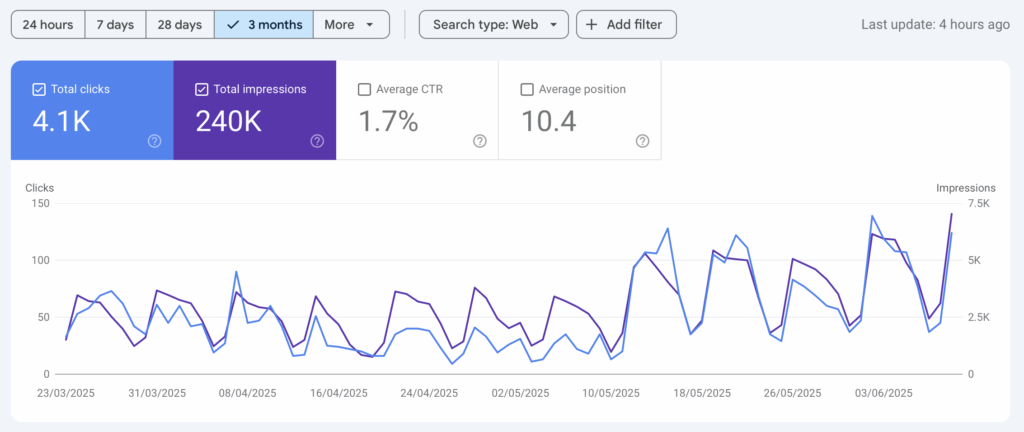
In the first month there was zero change in site ranking. At the start of month 2 the rankings suddenly jumped from around position 9 or 10 to position 5 or 6. And how many extra site visitors do you think this resulted in?
I was now receiving 4x the normal volume of Google Search clicks!
Normally I would discount this jump as an anomaly. For example, perhaps some Mexican holiday had caused things to change BUT I have a control website.
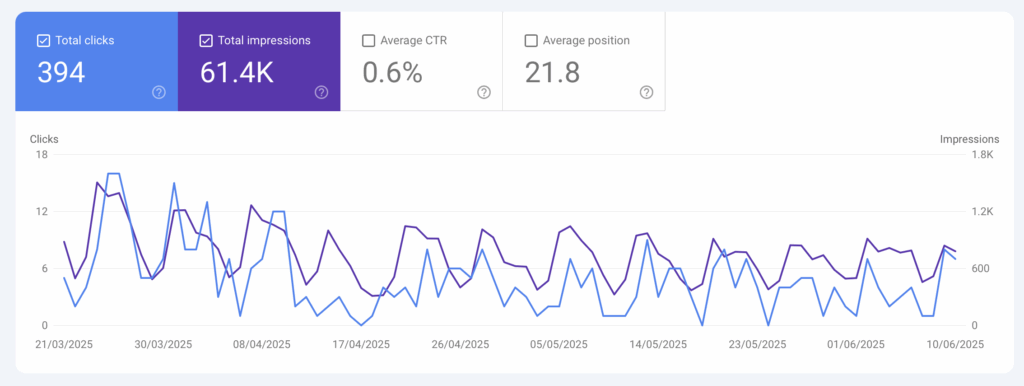
As part of the original deal another site had been thrown into the mix that ranked for pretty much all the same keywords. That second sites traffic and rankings did not change one bit during this period. In fact they declined.
Therefore I can almost conclusively say that back linking was the reason for the jump in ranking.
Change in impressions and clicks for the Mexican website (with paid back linking). From 10th May incoming clicks quadrupledSimilar site ranking for the same search terms (no back linking). Only a mild decline in impressions and clicks.
Interestingly I had only acquired 3 backlinks during that first month. However they were from well regarded sites with a domain rating of between 20 – 30 (the maximum rating being 100). Just 3 links had quadrupled inbound clicks!
More importantly a move of 4 positions up the ranking resulted in 4x the traffic. On average, position 10 receives 1.5% of search clicks but position 5 receives 5.1% so the 4x in traffic tallies well with that general statistic.
So where do we go from here? Obviously, position 1 is the goal and I think that is achievable, as my industry is low competition. Position 1 receives 40% of all search traffic so that is another 8x from where the site is now. That alone would restore annual revenue to $28,000.
How Much Profit Does this Make?
Purchase price: $5,000 (including some other sites but we’ll leave those out of this calculation) Back link cost: $3,000 to $6,000 (the latter if I need a full year of backlink building, which I’ll assume as worst case scenario) Cost of my time: $2,000 (2 days total at software engineer consultancy rates)
Total acquisition and investment expenses: $13,000
There are 2 scenarios to calculate return on investment:
Scenario 1 – Keep the Website as a Cash Flowing Asset
Annual income of $28,000 less back link expenses ($3,000) = Annual Profit $25,000. Factor in the purchase investment @ $13,000 and the annual return is 192% on original outlay.
Where else could you get 192% return on your investments? Nowhere!
Scenario 2 – Sell the Website
In this case I would keep the site for 2 years to show a good track record of profitability to the potential buyer. Calculations as follows:
Total profit (same as scenario 1) = $25,000 x 2 = $50,000 Less purchase cost: ($7,000) Website value @3x annual profit: $75,000 Less sales commissions (10%): ($7,500)
Total income for 2 days of my time: $110,500.
Yes that’s a nice number but this experiment needs room to run to see if it’s achievable. However if I scale back my expectations from position number 1 the numbers would change as follows:
Profit According as a Function of Search Rank
When selecting a target for acquisition and improvement I think the most important metric is to asses where you think you can get to in the search results. For example position 1 may be untenable due to a very well linked competitor – but is position 2 possible? Or 3?
With my Mexican site, if I maxed out at position 2 then I would net $55,000 in case of a sale. For position 3 that number drops to $28,000. Even with the latter that’s still an earning of $14,000 per day of my time. In many countries that’s a full time salary!
How to Scale?
When I bought this site I promised myself I would NOT be doing any writing, blogs and other time consuming things. It was to be a pure back linking experiment, with almost zero of my time invested. Therefore, if I will not expand into other content areas this sites scalability will be limited once I rank at #1 for my particular search terms.
Thus I will sell the site once I get close to that ranking goal.
I’m already looking at acquisition of another website but at 10x the size (~$50,000 purchase price). The key is for that site is that it’s in a similar position with plenty of ranking upside. The upside, all else being equal, is somewhere between $140,000 and $1.1 million per day of my time.
Now that’s food for thought (although I suspect this process will be less scalable the further up the ladder I go).
I’m holding off for now though as I want to run the Mexican experiment for at least another 4 months to see how it actually goes! Look out for updates here!
So you have an idea and you probably think that 50% of the hard work is done. Now you just need someone to build it and millions will roll through the front door. You, sir, are one of many “Ideas Founders“.
Ideas Founders believe in their idea so much that they think success is a certainty.
Well, it’s bubble bursting time – very few companies get to that point. In fact, of VC funded companies in 2023 a whole 90% went bust. Your chance of not failing, if funded, is 10%. I’d even wager that a portion of those 10% barely make enough money to pay back the investors.
And what if you’re not funded? Well the odds drop another 10 fold so we’re looking at 1%.
Yes, I know your idea is amazing.
Yes, I know you have a spreadsheet.
Yes, I know you’ve paid to have a kick ass design made.
Your odds of success are still less than 1 in 20. I know this because Venture Capital makes all its returns from unicorn companies, which are 1 in a thousand. You don’t see the 999 that didn’t make it.
But YOU ARE A GENIUS and still not dissuaded. You will manifest this product into the marketplace.
The Product Creation Process
Every business product starts with an idea. Did you know that ideas are the most abundant mineral on Planet Earth? Literally millions appear in peoples heads on a daily basis.
However, your idea is unique, well researched and validated.
So now you need to build that idea. You need something that us techies call a Minimum Viable Product (MVP). Then you can go out, test it, get feedback and iterate. This might take 4 months if the stars align, but more like 6-18 months.
With total abandon you scrawl 10 lines of “specification” onto a napkin and request quotes from dev shops. Very quickly, though, you realise it’s expensive. You’ll need to part with at least 50k (but trust me you’ll always end up paying double that to get what you want).
Problem is, you don’t have 50k, or if you do, you don’t really want to part with it. (But you still 100% believe in your idea).
Of course this is not a problem as you have valuable stock to give away, right? That’s why you try to flag down a programmer whom you shall name CTO, offering him a huge chunk of your valuable company, maybe even 40%.
Now you need only sit back and wait for him to build your masterpiece, with the occasional checkup call to see how your brilliant investment is doing.
Show Me the Money
Whilst your resident geek has been toiling away in his basement you’ve been doing a lot of work. Modelling financial projections, thinking about investment rounds, valuations and more. In fact your spreadsheets are a work of art. They are so good that you could sell them to buy a mansion and Rolls Royce with plenty of change left over for a private island. You are a genius.
Then, an alarm goes off. Time to check in on your enslaved programming basement dwellerChief Technical Officer.
Progress is going really well and the app looks good so you order it to be published. 1 week later you check downloads and sales figures.
No downloads. No sales. No nothing.
Hmmm, the product must be faulty. Time to have a heart to heart with your CTO.
Despite “motivating” your CTO (another skill from your infinite stack) the masses still have not arrived…and there is still ZERO revenue. What gives?
The End of Your Company
After another 6 months of iteration there is still no revenue and you’re bored. It must be the technology that sucks. Maybe you should have had the Geek use React.js instead of Angular. Anyway, never mind, you’ve just noticed that a local coffee shop is doing amazingly well so you dream up a coffee subscription app that they could pay you for.
This shiny new thing is what will get you that yacht.
That old idea from a year ago simply didn’t have the right tech stack or CTO and that’s why it failed. Coffee is the new money maker in town.
You gleefully part ways with that awful CTO and immediately begin interviewing for another one. This new one must be passionate about coffee, subscriptions and business processes. This time, it’s different.
Why you Failed
I hope that my sarcasm was strong enough for you to realise one thing:
Sales is everything.
No matter how good your CTO and product you must still put it in front of people and push for a sale. No sales means no revenue means no company.
You may say this is obvious but many “Idea Founders” don’t realise it, wasting inordinate amounts of CTO time in return for stock that is worthless.
Why You Won’t Get a CTO for Free
The devils bargain is to hire a CTO for 40% of equity right? That way you get a competent employee for free, right?
Actually, no.
Any seasoned tech guy, be that lead dev or CTO is going to look at you very critically.
How many pre-sales do you have?
Did you create a no-code version of your app to see if the market wanted it?
Did you pay someone to create a basic MVP that you have signed letters of intent for?
If the answer to these questions is no then he’s going to give you a hard pass. He wants to know what you bring to the table. And no, an idea is not worth anything.
You may think that your offer of 40% equity will right this situation, and you’d be wrong. Let me show you why by asking a simple question:
Where could I sell a quarter of my 40% stock, right now, to pay my bills?
That’s right. Nowhere. Would you, the genius “Ideas Founder” even buy them? If my 40% is worth 400 million in the future then I’ll give you 10% now for a bargain price of 100 thousand! Let me guess, you won’t take that deal.
AND YET, Ideas Founders expect us tech people to take worthless equity in return for a year of hard work building a product.
Equity value is built, not dreamed into existence by your ideas.
No-one serious is going to sign on to your company by the strength of your idea alone. 12 months of hard work in return for nothing – or I could build 25 of my own mini products on the web and float them to see what sticks. One of those could be worth 100k / year for 10 years. That’s a cool million in my pocket (fora few weeks of work).
How does your 40% of nothing compare to that?
Don’t believe me? Just have a look at Indie Hackers or Product Hunt to see all kinds of one man band success.
So How do You Get a CTO?
So far I have taken a big steaming dump on your dreams of getting a free engineer. Now let’s see how you can actually attract and keep one.
1. An Engineer is not a Nerd, He is an Artist
You may see Matrix code when you walk into an engineers office but he sees pure art. There’s something amazing about creating the perfect code that just gets us going. The ONLY way you get this out of someone is to not make them feel pressured.
And can you guess how to get average output from an engineering rockstar?
Easy. Simply treat him like an employee, one you don’t even pay. Order him around all the time and interrupt him continuously asking what he’s working on now.
How far would Leonardo Da Vinci have gotten if his boss has been looking over his shoulder every 30 minutes?
When you take on a CTO, he is your partner, and not your employee.
Your CTO has a skillset that you do not possess so let him use it according to his best judgement. Never order him around. If you want something built then communicating that is fine (notice I said communicate and not order).
Ultimately you’re taking him on to build the product and make sure it runs. Your technology views should be checked at his door or only brought up as though you were talking to your wife on Valentine’s day, and not your dog who won’t drop the ball.
In short, he’s the f****** CTO so he decides technical things. Do not interfere and you’ll get the best from him.
2. WTF do You Bring?
Yes, you. And no an “idea” is not a thing. The 2 things you must bring are:
Funding, or a solid route to funding (without sucking up CTO time before that)
Sales ahead of time or gold star sales experience from your past
If you only come with Option 1, then that is acceptable if you will pay for your CTO’s time, at least partially. If you also come with Option 2 then you are an A star candidate and CTO’s will throw themselves at you like you’re an A list celebrity.
Personally I can count on one hand those I’ve met with Option 1 and am yet to meet someone who also has Option 2.
You may look at this list and think you have neither but you’ll plough ahead anyway. Well, for that let me refer you to this Reddit thread (there are many more like it). Tech people are wise to your tricks. Offering us nothing for work doesn’t go so well when places like Facebook will pay you 150k starting salaries (plus stock).
If you really believe in your idea then you can make an investor believe, and he will part with the cash you should pay the CTO to actually make your product.
Who the F*** Are You to P*** on my Dreams?
Hey, I get it. You’re angry reading this article. Your first reaction is to assassinate my character then I have no standing. So here’s my character for you:
I’m just an average tech guy, building stuff I think will work. Every single day. Whatever I build I keep 100% equity in. I haven’t needed a job in 10 years, and probably never will. I’m not rich or poor but happy every single day because I love building – and I get to do it every day.
Ps:
If this article has offended you then please tell everyone on social media and link to it so they can be enraged too. All those free backlinks will sure teach me a lesson.

A freelance developer makes client websites, apps and software. He must also maintain those sites and applications over time as updates are always required and bugs appear from time to time.
How Much Can a Freelance Software Developer Make?
A typical freelance developer can expect to make between $40 – $250 per hour. Of course this depends on many factors such as what frameworks or languages you specialise in. It also depends on how good your networking skills are and how much real world freelancing experience you have.
Now, if you’re based in Africa or Eastern Europe these hourly rates may look insane but they’re based on people hiring in the first world. If you are based in a poor country then you should be looking to find work outside of your borders!
Why leave all us devs in the first world to take the cream? You can easily get some too!
How to Learn Coding to Become a Freelance Developer
First and foremost you need to love building things! Development is all about creating your clients (or your own) dream product. If you don’t like building then you won’t last the course. You should only be a freelancer in a subject area you love.
The next thing you need to do is learn how to code with good architecture principles. What do I mean by this?
Well there are many, many ways you can learn to code but they are not created equal! Many teachers will teach you very bad habits (me included about 10 years ago!).
Those bad habits cause you to write bad code with many strange bugs, and this will ruin your developer reputation.
If you’re just starting out then find a decent course provider that has a good reputation among senior developers. Ie, ask a senior dev, “If you had to learn from scratch, which course would you purchase?”.
How to Find Clients as a Freelance Developer
There are 2 places you can find clients:
Your network
Job sites
The absolute best place to find paying clients is your network.
Your network is basically those people who know you, whether personally or through other people. A network client is much more likely to hire you, but if you’re a beginner then this may not be feasible at first. Therefore, go to the second option….
Your second option is to apply for one off jobs on sites such as Upwork. As you get started you can expect lower rates as these sites are very competitive. For example you may be competing with some guy in India offering $10 p/h and the client offering the job doesn’t know the difference in quality between him and you.
How to Win Jobs on Freelance Developer Sites
At this point everyone thinks that being a good developer will win the job. News flash: your clients have no idea what a good developer looks like, so they instead choose the developer based on 2 things. Understanding and rapport.
Therefore you need to sharpen your listening, thinking and rapport skills.
Here’s one little trick that will do all of that in one go, putting you ahead of everyone on these platforms:
Offer a free consultation over Zoom so you can understand their needs.
NO-ONE on these platforms does this and it blows my mind! Perhaps it’s because they’re a bunch of developers with zero people skills, I don’t know. This Zoom call approach works because it’s one of the principles of good sales – people buy from people they know.
Once you talk to someone over Zoom, you’re now more familiar than that Indian applying with his generic email messages. In fact you’re even seen more favourably over a professional company!
Yes, this will take a lot of your time (because you also need to prepare for Zoom calls) but just one good client is worth weeks of trawling through this process. Over time that client could be worth $100,000 so do the work now so that you may live like a king later.
My final tip is to respond to clients email instantly. Business conversions go up by more than 10x when replies are within a minute of the enquiry being sent!
How to Create a Freelance Developer Portfolio
More often than not, your potential clients will ask to see previous work. If you’re a beginner then you have none! This is one reason why you must LOVE building – because your first portfolio will be things you’ve built for yourself.
There is ZERO difference between your personal portfolio and a client based one. So take some pretty screenshots of your creations and get them on a website. Use WordPress or Wix or any other platform to show them off.
Once you have a portfolio then copy it to social networks such as LinkedIn.
Being on social networks (especially LinkedIn) helps to make you legitimate in the clients eyes. Remember, a client is always looking for any reason to not hire you and not being present on the internet is just plain weird these days!
Do You Need an LLC or Company to Start Freelancing?
I would say absolutely not. Having to register a company, get bank accounts etc will just slow you down and you may never start. instead of putting procrastination roadblocks in front of just get started on finding clients!
After 3 or 4 clients you can start running your freelance jobs through a business, whatever structure the latter takes. This is a good idea to protect you from personal liability!
Freelance Software Developer FAQs
Here are some of the most common questions I get from beginners.
How Hard is it to Become a Freelance Software Developer?
It’s not hard but the most important thing is to be passionate about building! For example, I loved Lego as a kid so coding is perfect for me as it’s just digital Lego building!
Once you start learning you should love coding – if you don’t then please don’t choose this as a career.
Are Freelance Software Developers Wanted?
The whole world is moving to digital and those things need to be created and maintained. This always requires a developer as the average worker cannot do it. Therefore demand for developers is going up all the time.
What Skills Make You a Successful Freelance Software Developer?
It goes without saying that you need to be able to code and have good software architecture skills. This keeps your code bug free and well organised. What most people don’t realise is that you need to have people skills too! Freelancing starts with marketing yourself and convincing a prospect that you’re the man for the job.
Which Programming Languages are in Demand for Freelance Software Developers?
There is no right answer to this question because is depends. However, you cannot go wrong with the classic and always in demand languages. These include JavaScript, Python, Java and PHP.
With each of the above languages you should also learn an associated and popular framework. For example React or Angular with Javascript.
Can a Freelance Software Developer Make 10K a Month?
Absolutely you can! If you market yourself everyday by hopping onto Zoom calls you’ll eventually be the guy to go to for all your clients. The next time they have a big project (or their friend has) then you will the one stop shop.
At this point you can start to increase your hourly rate for new clients and jobs. Just keep raising it until people start saying no – then you’ve found your ceiling. My rates are $125 p/h but I usually make $250 p/h as I have experience and can code much faster than many devs.
For perspective $250 p/h is $10,000 after only 40 hours, that’s just 1 week of work!
Fun fact: My record is $1,200 p/h as the work was much easier than I had anticipated!
About the author: I work as a software development freelancer. My minimum hourly rate is $125 but I usually double that to $250 as I get work done very, very fast. That’s the benefit of having skills and experience!
This post is all about how you can get started with freelancing, and it’s not specific to developers. You can have any skill and still follow my process below.
Is Freelancing Tough for Beginners?
I hear this all the time and the answer is – absolutely not! Freelancing can be broken down into 2 simple activities:
Having a skill that people need (this can be anything)
Finding people who need your skill (who will also pay)
Beginners often come to me saying their skills are really bad and they don’t know how to apply for freelance jobs. And you know what I tell them?
Can you work a smartphone? Yes? Do you think there’s a 95 year old woman out there who would pay you $20 to show them how to use WhatsApp?
Obviously the answer is yes! That old lady is going to think you’re a complete genius, even if you’re not that great on smartphones. And because she thinks that, and gets a result, she will happily pay you!
So freelancing is for everyone, but especially for beginners as you put in the most effort, unlike us lazy veterans 🙂
Which Freelancing is Best for Beginners?
Well, I’m a software developer so naturally I say that’s the best. But I could be wrong. After all there are plenty of graphic designers that do great business, some even making over a million dollars a year!
Therefore the type of freelancing you should do should be what you like doing.
You should not look at how much your hourly rate will be and then choose a path. That is the way to demotivation as we rarely stick to paths we don’t have a passion for.
If you like making wooden benches then make them for clients.
If you like making apps then be a freelance app developer.
If you like designing things then be a graphic designer.
If you have a choice between two things then you should pick the easiest one, assuming you want to start getting paying clients right now. If you have a bit of time then you can opt for the harder thing as that difficulty keeps competitors out and allows you to raise your rates.
For example I’m a full stack developer – which means you bring your idea to me and I’ll do everything.
This is great for a client, only having to manage one person instead of a team of 4. It’s also a lot cheaper even at my high rates (which is also a reason I can charge those high rates).
However making full stack software is not easy and takes years to get good at it. So if you have the aptitude and the time then by all means go ahead.
However if you don’t want to spend a lot of time or just hate learning to code then choose something else you’re good at and love!
Do You Need an LLC to Freelance?
I would say that you don’t need an LLC to start with, because the process will slow you down and kill your passion. You’re reading this article because you’re on the verge of starting so just get started NOW and operate under your own name.
Take on a few small jobs just to test the waters. Then, if you enjoy freelancing you can always get an LLC later on.
The one caveat I have is that you should always have a water tight contract that limits your liability. Working under your own name means that clients can sue you for any assets you own so a great contract is essential. You should definitely spend the money on getting a template contract from a good lawyer!
You can also use that contract when you eventually open an LLC, so it has longevity.
Spending money on a good lawyer may seem expensive today but if someone sues you it will be cheapest protection you ever bought!
Put Together a Freelance Portfolio
So you’ve decided to start but you have no client. What do you show potential clients as a catalog of previous work? Well that’s easy!
Simply do some work for yourself and host that as the portfolio.
If you’re a graphic designer then make 10 logos / designs / prints.
If you’re a developer make 2 / 3 small apps and get them on the App Store.
If you’re a web designer then make 4 websites to show off your skills.
Is this cheating? Not really if you ask me. A portfolio is there to show people what you can do, rather than showing them that you can attract clients.
The beauty of this method is that you control what sort of work goes into your portfolio, so your potential client sees a unified interface. This makes it more likely they’ll sign with you because your portfolio looks very similar to what they need.
Contrast that to a portfolio with multiple types of work which can look scattered and unfocussed. That’s not as attractive to a client.
Finally, get that portfolio up on a webpage. If you have even minor technical skill then use WordPress, if not then use Wix or some other website builder. Your portfolio is no good if people can’t see it!
How to Find Freelance Clients – Starting Out
Now this is the potentially tricky bit, but only because there are so many options! If you’re a beginner then the best option is to start out on freelance job sites.
Freelance job sites such as Upwork, Fiverr and Freelancer have thousands of listings. However, clients on there expect a lot of work for relatively little money, but that’s ok.
As a beginner your goal is to get experience in applying for jobs and crafting your message. This will take time so be patient. You will be rejected dozens of times before you get your first job. I know I was! And don’t get dismayed at the low dollar amounts on offer.
In fact my first client was on one of these sites and the first job was a grand total of $250. Let me tell you I worked like a slave for that $250!
But guess what? When the next job for that client came up they only had eyes for me because I had proven myself. I quoted them $5,000 and they accepted within minutes!
How to Find Freelance Clients – Level up
Once you’ve had a few jobs from those job sites you will get a few follow on jobs from those same clients. My advice is to take them off the job sites and into direct contact with you. They should trust you by now so this won’t be an issue.
Yes those job sites love to keep you working through them and continue taking 10-50% of everything you earn but don’t let them! Imagine working for an extra hour each day to put money in their pockets.
Once your clients are truly yours you now have rate flexibility. Lookup the industry standard for your profession and start working your way there with each new job.
Do not be afraid to massively raise your rates! People are looking for valuable freelancing skills and cheap prices imply that yours are not valuable!
Yes, some clients will drop off but that’s fine. Trust me, you do not want to work for cheapskates and penny pinchers because they drain you of energy. You want to do good work for people who recognise and reward your value, because that’s a win-win situation.
At this point you should have adequate experience in quoting, discussing and delivering work. Now you are ready for stage 2 of marketing, cold outreach:
Get the contact details of local companies that could use your skills.
Send them an email introducing you and your services. Outline the value they would receive if they worked with you!
Follow up via email 2 weeks later or even call them.
The above process should be continuous, with at least 5 companies that you cold email each week until your working time is full. At this point you can stop cold emailing as your network will continue to provide you with all the work you’ll ever need.
How to Raise Freelance Hourly Rates
If you follow my process your work schedule will eventually be full as you’ll have more clients than you know what to do with. Now is the time to start raising your rates, even more than int he previous step.
Freelancers usually quake in fear at this point but fear not! I will give you a foolproof strategy for doing so.
It all starts with treating your clients with respect. Be up front and tell them that you love working with them but your time is completely full. Any new work is going to suffer in quality so you’re going to start parting ways with some clients so this doesn’t happen.
You’ve now just told your client there’s a chance they’ll be fired, which puts them in a mental state of wanting to do anything to stay on with you.
No client wants to start from scratch and find a trustworthy freelancer all over again. Whenever I’ve done this I’ve always had emails asking that they stay on as the “chosen one”.
In that same email tell them that you have to raising your rates by a certain amount to keep quality high. This is effective immediately for any new work coming in.
However, your existing clients can have the current rates for the next 6 months. This gives them some warning but also makes them feel special for getting a 6 month discount on your new rates.
This strategy has never, ever failed me but I’ve usually had 1 or 2 clients each time who say they don’t like the new rates – but they stayed on and paid them anyway!
Freelancing – Avoid Bad Clients
To end this long article allow me to show what a bad freelance client looks like. Here are some red flags in order of importance:
Expects the world for little money (fire this client as soon as finances allow, they will drain your energy)
Is rude and dismissive of you (definitely a firing offence)
Micromanages you by requesting many tiny changes (these I move to a different pricing model consisting of a base project rate, then an hourly extras rate for other changes above a beyond the contract. This usually stops the micromanagement dead in its tracks. You can quote something nice and pricy for overage extras: $200 p/h with minimum of an hour usually does the trick.)
Pays their bills late (not necessarily bad but you should draw a line in the sand where you stop doing work until invoices are made up to date. This works very well if their website or software breaks for example. You’d be amazed at how fast accounting get their finger out when the website stops bringing in revenue…)
These traits are more guides than hard and fast rules so use your own judgement. If you see them appear time and again in the same client then it’s time to fire them or find another solution. On the other hand if these issues happen once or twice I would say that’s fine and a normal cost of doing business.
Freelancing – What a Good Client Looks Like
You will come across clients you love during your career. Unfortunately, at the outset you have no idea which ones are good and which are bad! It usually takes a few weeks to discover this (which is why I urge you to fire clients if need be).
That said here are some traits of good clients I’ve seen over the years:
They trust you to provide your expertise and don’t question everything you do (a few questions are fine though!)
They usually pay their invoices on time.
They’re happy to communicate with you throughout the job (this is important if you don’t want an unhappy customer at the end)
They’re polite and easy to work with.
Summary
Freelancing is a very rewarding path to take, both financially and mentally. You get to meet people who are the movers and shakers and who knows, you might even pair up with one to make your own killer business!
So, even if you’re a beginner, then I encourage you to absolutely go for it. Get your mini portfolio in order and start applying.
Don’t overthink the process and just get started.
To help you get started you can check out my Freelancer Flow Chart available at iamdev.net/free
When writing files to disk in node you have to be careful. Many times file writes require insertion of large chunks of data over a (relatively) long period of time. The key thing to avoid is opening the file multiple times which is resource intensive.
It is far better to open the file once and hold that file handle in memory, ready to be used the next time. For that we use the createWriteStream async method.
createWriteStream async in Node fs
This method gives you ultimate control over file handling, which means more responsibility. Therefore you have to handle file opens, closes, errors and everything else that may go wrong.
Let’s first look at the single line of code needed to create a createWriteStream:
//cteate your sreite stream with optional optionsfs.createWriteStream (myFilePath,myOptions)------------------------------------------myOptionscanbeanyofthe following:options<Object>encoding<string> Default:'utf8'//file encodingautoClose<boolean> Default:true//autoclose after write? false = close it yourselfemitClose<boolean> Default:true//emit event to notify file closedstart<integer>//where should you insert the content?highWaterMark<number> Default:16384//how much data should this method gather before it's flushed to the fileflush<boolean>// File descriptor flushed prior to closing. Default = false.
Most of these will not be specified by you, just leave them as defaults. However, you may want to play with highWaterMark depending on your use case. That sets the buffer size and should be matched to the size / frequency of data streaming you have.
NOTE: Always use a resource monitor such as atop or htop to know if you have issues!
createWriteStream async Full Example
Before we start, note that to use createWriteStream in its async promise based version (instead of callback versions) you use the fs module and not the fs.promises module! I know, I know it’s counterintuitive!
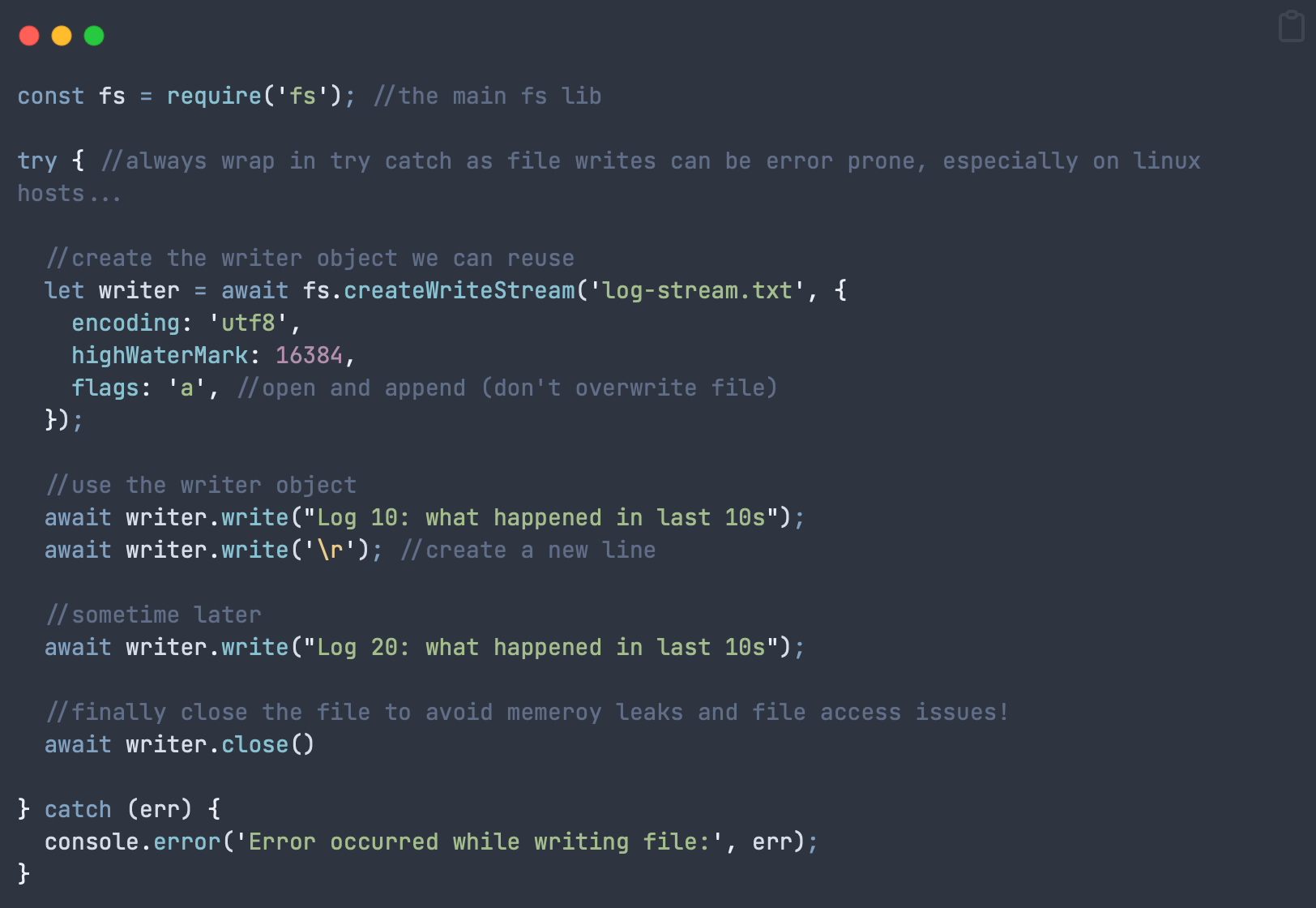
The code below opens a write stream, writes something to a file on 2 separate calls then closes the file.
constfs=require('fs');//the main fs libtry{//always wrap in try catch as file writes can be error prone, especially on linux hosts...//create the writer object we can reuseletwriter=awaitfs.createWriteStream('log-stream.txt',{encoding:'utf8',highWaterMark:16384,flags:'a',//open and append (don't overwrite file)});//use the writer objectawaitwriter.write("Log 10: what happened in last 10s");awaitwriter.write('\r');//create a new line//sometime laterawaitwriter.write("Log 20: what happened in last 10s");//finally close the file to avoid memeroy leaks and file access issues!awaitwriter.close()}catch (err) {console.error('Error occurred while writing file:',err);}
Important notes: The above code shows a simplified step by step process to make it clear for you. To implement this in a real app, you would never write it this way, instead you’d create separate functions to handle file open, write and close – then call each function as you need them in your code.
createWriteStream Events and Listeners
FS gives us a lot of control over the file handling process, which means we can manually do everything ourselves. One of those options is choosing whether fs should close the file automatically or if we should listen to events and do it ourselves.
If your file write is long in duration, over multiple chunks, then you can tell FS to leave the file open, saving the overhead of opening it over and over.
This is perfect for server logs, for example. To do this we will listen to events called by createWriteStream. Here’s an example (code below):
Open the file writer with createWriteStream
Tell createWriteStream that we want to handle file closing ourselves (autoClose flag)
Register event listeners for open, ready and close
Write some text to a file
Use the listeners and callbacks to decide when to perform next actions
Close the writer once a write has been completed
Remove all writer listeners to avoid memory leaks!
Next, I have written the code in a step by step manner which is not realistic. You would separate this out in production to be called by the main program, as needed:
Example createWriteStream async Code (Events)
constfs=require('fs');//the main fs libtry{letwriter=awaitfs.createWriteStream("log-stream.txt",{encoding:"utf8",highWaterMark:16384,autoClose:false,emitClose:true,flags:"a"})//add a listener with options such as open, close, readyawaitwriter.addListener("open",async()=>{console.log("Log file OPEN!")})awaitwriter.addListener("ready",async()=>{console.log("Log file READY!")})awaitwriter.addListener("close",(fd)=>{console.log("Log file CLOSED")})writer.write("hello world \r\n",async()=>{awaitcloseWriter(writer)})}catch (err) {console.error('Error occurred while writing file:',err)}asyncfunctioncloseWriter(writer){awaitwriter.close(async()=>{awaitwriter.removeAllListeners() // important to avoid memory leaks!})}
Worth mentioning again: DO NOT forget to unsubscribe to your writer listeners on writer close or you’ll get memory leaks!
Summary
createWriteStream gives you power over all aspects of file writes but with great power comes great responsibility!
As long as you handle events appropriately and monitor resource usage then you should be able to avoid pitfalls of this method and retain complete control over your file writes.
TLDR; Any code in Javascript or Typescript that uses the word “promise” is asynchronous.
What Does Async Mean?
When coding asynchronously it means that your code is running on a different thread or CPU core than the main program that started the process. This leaves the main thread free to do important jobs like keeping the user interface responsive.
How is Promise Related to Async or Callbacks?
Async code used to use callbacks way back when. These are functions that get called when the long running task has been completed.
Analogy: Imagine sending your little brother to the shops and telling him to call you when he gets there so you can give him your order. This is asynchronous as you can do another useful task whilst he’s driving there. The phone call (callback) tells you the driving task has ended and he’s ready for instruction *.
* This is how all little brothers should behave, awaiting instruction from big bro 😉
Back to code: This callback system is also known as a promise, as in: I promise to call you when my task is finished.
Async and promises are the same thing.
Async delivers exactly the same experience as a promise or callback, except it makes it MUCH more readable. Async is what we call syntactic sugar.
//The following produce exactly the same result, both keeping long tasks off the main thread//PROMISE VersiondoSomething ((result)=>{//CALLBACK code to run after doSomething has finishedprocess(result)});//asynchronous syntactic sugar Versionletresult=awaitdoSomething()process(result)
Where Did Async Come From?
Historically, as CPUs got more cores and threads we needed a way to make use of the parallel processing power. This is where the idea of offloading code to another thread came about.
Async is short for asynchronous which means “happening at the same time as something else”. On a modern CPU that means you can have 32 things happening simultaneously (or even more with clever hyper threading technology!).
Should Your Code be Async?
Well, it depends. You shouldn’t always use async over sync or vide versa. There are specific situations where you would choose differently.
Most beginners think that async keeps your UI thread free therefore all code should be asynchronous, but that is definitely not the case.
Neither async nor sync are better in Javascript. Rather, they both have specific use cases. This post will show you the most common cases for each and the real world scenarios in which you would use them.
TLDR; Use async code for all long running processes that take longer than 30 milliseconds. You can use synchronous code for everything else.
What is Synchronous Code?
This is code that executes in the order it is written. Take this example, where 3 tasks happen in order:
Task sequence: A -> B -> C
Therefore task B cannot start until A is finished and C cannot start until both A and B are finished. Synchronous code is normally where beginners to Javascript will start as it’s easy to write and understand.
The Javascript interpreter reads your code line by line, executing everything from left to right and top to bottom. It does not move on until a line has finished executing.
What is Asynchronous Code?
Async code allows for tasks to happen at the same time. In our example tasks A, B and C could all happen in parallel, assuming they did not rely on each other for a result.
Tasks happen at the same time: A & B & C
However, if task B and C depend on A then you cannot run them all at the same time! In that case you might think you need to revert to synchronous code, but that’s not actually necessary. You should still use async code because you don’t want to tie up your main worker thread with long running tasks.
This ability to use asynchronous code in a synchronous manner is where the confusion lies for most new coders.
Keeping Your JS App Responsive
Let’s say you have task C which relies on output from B, which relies on A. Clearly you would write these:
Run tasks: A -> B -> C
This looks exactly the same as our synchronous code example earlier. However, what if each task takes 2 seconds? That’s 6 seconds where your app is non-responsive, which is awful UX design. In fact Android will force close your app if you go over 15 seconds!
This is because Javascript usually runs on the “UI or display Thread”. This is the CPU thread that conducts the orchestra of what’s happening in your code. It should be kept free of long running tasks, so it can concentrate on orchestration.
Analogy: Imagine if an orchestra conductor had to conduct everyone, play the flute, guitar, piano and why not throw in sweeping the floor. Impossible right? And that’s why you keep long running tasks off your UI thread.
If you’ve ever experienced an app crash (app not responding error) then it’s very likely that the developer wrote long running synchronous code on the UI thread!
Async Code with Await / Promises
Therefore, for long tasks, we have to take what should be straightforward synchronous code but use it in an asynchronous manner! This tells the system running your app to offload the task to a different CPU thread and please “callback” later with the answer.
At some point in the future the answer comes back and you can use the result. This is what a callback looks like:
getMyData((result)=>{//this is the callback sectionprocess(result)})
However callbacks can get very messy if you have a highly functional app. This is what happens if you have tasks A, B and C all waiting for each other:
The above code, ladies and gentlemen, is called callback hell. Imagine 10 processes with multiple steps between them and those nested callbacks can become insane sea monsters that will cause you to smash up your work cubicle!
Callback hell is why the concept of async & await was invented.
Javascript – Async and Await
Async await is doing exactly the same thing as those callbacks earlier, except you write the whole callback in one line so it looks synchronous code, making for much easier reading.
Let’s go back to the example with long running tasks A, B, C. Each must wait for the one before so it can now be written:
The advantage to writing async code this way is that all that processing and waiting is now kept off the main UI thread. Therefore your app remains responsive. Coding like this is very, very important on the server side as you always want your server to be reachable.
Yes and no. Async code should be used for long running or intensive tasks or ones where you do not know how long it will take. For small things such as storing variables or changing simple UI elements then you are perfectly fine with synchronous code.
The above recommendation comes from understanding the frame rate of applications. Generally a user interface is considered smooth at 30 frames per second. Therefore you need to ensure that the UI thread is free every 1 second divided by 30 frames. That equates to a frame draw every 30 milliseconds.
If your task goes over this 30ms threshold then make it async! An easy way to test this is to run your app for real, triggering multiple calls of the synchronous function that you’re concerned about. If the UI stays smooth then you’re good to go, subject to the below chapter on when to use async.
You can also test how long certain functions take by opening the console on your browser (Chrome or Safari) and using the timelines functionality.
When to Use Async Javascript
As a rule of thumb you would always use async in the following situations:
Making a network call to a server or API
Processing something heavy (large data file or image)
Making a database call for reads or writes
In fact, as you progress in your coding skill you’ll notice that more and more libraries use await async. Therefore it’s best if you get familiar with these concepts now, as it’s also encountered in many other programming languages and frameworks.
Wrap Up
Async code offloads work onto another CPU core / thread, keeping the main one free for user interactions or server responsiveness. You should always use async code where user experience and responsiveness matters, keeping those long running and unknown length tasks in the background.
This post is the once stop shop for you to see tech, software engineering and IT salaries from around the world. Simply click any link below to see what you should be earning! These are updated every year so you can get an idea of the progression, and extra cash, that you should be seeing!
See below for instruction on how to get your ChatGPT API key.
What is ChatGPT?
ChatGPT is an AI language model developed by OpenAI. It’s designed to understand and generate human-like text based on the input it receives. Essentially, it’s a computer program that can carry on a conversation, answer questions, and provide information on a wide range of topics.
Foundation based on GPT (Generative Pre-trained Transformer)
ChatGPT is built on a series of models known as GPT (Generative Pre-trained Transformers). The most recent versions, like GPT-3 and GPT-4, are among the most advanced. These models are trained on vast amounts of text data from books, websites, and other sources, allowing them to generate coherent and contextually appropriate responses.
Capabilities of ChatGPT
ChatGPT can perform various tasks, including:
Answering questions: It can provide explanations, summaries, and insights on numerous topics.
Creative writing: It can help generate stories, poems, essays, and more.
Problem-solving: It can assist with math problems, coding issues, and logic puzzles.
Language translation: It can translate text between different languages.
Conversational agent: It can engage in dialogue, offering advice, companionship, or just a chat.
Usage
People use ChatGPT for many purposes, such as learning, content creation, customer service automation, and even for entertainment. It’s integrated into applications, websites, and services as a virtual assistant, and it’s often accessed through chat interfaces.
Limitations
While ChatGPT is powerful, it’s not perfect and may sometimes provide incorrect or nonsensical information, lack understanding of context, or exhibit biases rooted in the data it was trained on. It’s also important to note that it doesn’t have real-time awareness of current events unless specifically trained or updated to do so (even though they claim GPT4 can search the internet!).
Ethical Considerations
OpenAI emphasizes the importance of using AI responsibly, ensuring that the information provided by models like ChatGPT is accurate and fair, while also protecting user privacy.
Have you ever felt trapped in your 9 to 5 job? I know I used to and every single day I wondered if it was possible to escape.
Fast forward 10 years and I’m now an entrepreneur who owns his time, but I certainly didn’t start that way.
In fact my starting position was probably like yours, just about covering my bills with a 9 to 5 JOB (Just Over Broke).
This is the story of how I went from that job to a $12,000 freelance contract in just 4 weeks. You may be thinking that I had amazing skills to have someone pay me that amount of money…
You couldn’t be further from the truth.
I was a complete beginner when I started applying for contracts and, as I would learn, this fact did not matter one little bit.
Read on to see how I escaped my 9 to 5 prison and how you can too, even if you have very little to offer.
What’s Your Catalyst?
Every great prison escape has a catalyst, some small event that finally breaks the camel’s back and commits you to change.
For me it was my former boss.
I used to work hard at my job for just 2 hours a day. That was all I needed to output the same as my colleagues so I figured I was doing OK. The remaining 6 hours I would research “get rich quick” schemes (all of those failed by the way).
One day the big boss calls me in, holding a stack of printed papers:
“The IT department has sent me a report of everything you’ve been doing on your laptop that’s not work related….”
I’ll spare you the details but I got an “official” warning that day. After the shock wore off I asked why I was being reprimanded. After all, my work was high quality and always on time. His response?
“We expect you to work for the company whilst you’re at work.”
Translation: You will work as hard as possible for us so we get rich. We own you for 8 hours every day. Do not use that time to enrich yourself.
This attitude from the higher ups of “never enough” really p*****d me off. I knew something had to change.
I bet that you’ve experienced something similar.
Ever wasted a whole day doing nothing important except trying not to get caught by your boss?
Ever been at a meeting and thought “What a bunch of morons. I can do so much better.”?
You may think that being surrounded by idiots and achieving nothing isn’t harmful, but it is. You are slowly being dragged down to their level and becoming one of them, but there is hope.
When you have these thoughts, hold on to them. They are your catalyst of change.
You Must Act Fast
At this point it’s vital to act fast before these thoughts fade. You have 2 choices:
Sit there and take it like a good little inmate or…
Make a plan to escape
You’re here because I think you want option 2, to escape as I once did.
Escaping Prison is Not Easy
I can hear your objections already:
How do I start?
How do I find clients?
Who will pay my bills?
I had all these fears and more. The way was not clear at all. I hopped between ideas, never fully committing to any one thing. In fact I even had nightmares about being jobless and broke.
Pain Makes You Move
At my job the prison guards were watching me ever closer, making sure their inmate worked for the maximum 8 hours a day. This new level of micromanagement kept me frantically searching for that escape tunnel.
After much procrastination I decided to try freelancing, due to the fact I could get paid a hundred dollars an hour (in theory).
I had only one skill to offer though – very basic coding. It was so basic that I thought that no-one would ever hire me. In fact the more I thought about it, the more hopeless I felt, but my situation forced me to try.
Hopeless and Depressed is Normal
If you plan on freelancing then know this: You will feel completely hopeless and depressed at the start.
During hard times I like to think of the famous escape scene in the film: Shawshank Redemption. The main actor chisels for months through hard rock, crawls through a mile of sewage tunnel and emerges outside the prison, looking and smelling inhuman.
But he is free.
We humans prize freedom over all else but would you crawl through miles of sewage to get it?
How I Escaped and You Can Too
With my prison guards keeping an ever tighter watch I sneakily applied to over 50 job posts on freelance platforms. Eventually one client replied (yes, only one).
He wanted an Android demo where you could record rapping over a backing track. He was only paying $250, which was far too low, but I had no choice. I took it on.
It turned out to be a nightmare technical problem which took me 4 days to solve – resulting in a grand $8 per hour. But you know what?
I WAS HAPPY!
I had built something on my own time, gotten paid and had the beautiful beginnings of my tunnel of freedom.
If you decide to create your own tunnel of freedom then you will never forget this first taste of free air.
You will feel elation in a way most people have not and never will.
Are You Professional? Does it Matter?
The demo app I delivered had that one recording function but it was a mess of third party libraries and buggy code. 100% certified BEGINNER level code.
But you know what? The client was extremely impressed. After all, he could barely login to Facebook without losing his way and coding was black magic to him.
From this I learned that your expertise only needs to be a certain distance ahead of the client to seem extremely impressive.
However there was one little problem – I was being paid too little. High off the success of my first completed contract I turned to solve this new dilemma.
Pay attention because this section is extremely important for your success.
The Fear of Moving from $8 to $80 per hour
You will struggle with this step of the journey. Lord knows I did. The reason is down to human nature.
We humans are anchoring creatures. That is, once we define some part of life or create a habit then it becomes an anchor to reality.
This is not a bad thing as we need anchors in life to be happy. However, they also hold us back.
I’ve found that the greatest “hack” in life is to realise which anchors are holding you back and make a plan to replace them with newer, bigger, better ones.
Upping my rate from $8 per hour to $80 per hour required me to cut away that old anchor and create a new anchor to drop.
Make no mistake, this process is scary. You’re risking $8 to make ten times that, but if you lose then you make nothing at all.
How You Get Paid More
Once I had shown my value with my black magic coding skills (held together with duct tape), the client wanted to engage for a fully published app.
I started having phone calls with the client, not just to be helpful, but also because I wanted to see if he was serious and had the money to back it up.
I was being selfish.
I don’t mean selfish in the incorrect way it’s used today: “I’m a horrible person who never thinks of others”. No, instead I mean the classical definition of selfish in that you prioritise yourself and your needs.
You need to find a client who will pay and not waste precious time. You only do that by having your own ideals and prioritising them.
How to Know if Your Client is Serious
In my discovery calls with the client I found out that he was backed by a retired entrepreneur who gave off a rich vibe. Not “I drive a Rolls Royce” rich. No, I mean he had a deep tan that only someone with much leisure time could achieve. He also wore nice clothes, not with garish logos like Armani wannabes, but really high quality with subtle branding.
However what really sold it for me was his character. He was very open and willing to discuss any aspect of the app including costs, business model, ongoing expenses etc. Clearly, he was very experienced.
You need to keep an eye out for such people. If you can provide a valuable service they are a reliable financial ticket out of 9 to 5 and you can learn a lot from them.
How to Charge Your Worth (Quoting for Work)
After these discovery meetings it was looking good so I promised a quote.
This was the most painful and agonising thing I have ever done.
You see, I wanted to charge my worth but I was afraid. What if he didn’t accept my prices? What if he told me I was trying to rip him off?
I spent 2 days trying to guess an acceptable price and eventually settled on $6,000. My girlfriend looked at the number and, like good women do, said it wasn’t enough. I quickly doubled it to $12,000 and sent it before I could change my mind.
Sometimes you just have to press send and let the gods decide.
The next 16 hours were agonising! Would he accept? Would he try to knock me down? Would he ghost me?
Would I be banished back to my daily prison sentence, working under the unforgiving gaze of my job prison guards?
Will Your Client Accept High Prices?
Within a day the client replied to my quote, saying “That’s fine, when can we start?”.
Just. Like. That.
The next day a deposit of 3 grand arrived via old school cheque. I quickly walkedran to my bank to cash it before the client cancelled everything!
Then I went to the Apple store.
I picked out a brand new MacBook Pro, and my favourite part? When the assistant asked me if I wanted a payment plan I simply said, “No thanks, I’ll just pay cash”.
God, that felt good.
Can you imagine doing the same thing with your first well deserved freelance payment?
That’s where I’ll end this story but suffice to say my escape tunnel was successful and this story was the starting point.
Do You Know Why the Escape Plan Worked?
It’s time to extract the important parts of this story so you too can construct a successful escape plan.
1. No customer wants a big quote before they know you
With a low risk $250 job I first proved myself to the customer. This is easy to see looking back but at the time I thought the amount was far too low. I almost didn’t apply!
If you’re just starting out then you can take a few low paying jobs if that’s all you can get. You need the experience and you never know where it will lead!
Raised rates come later, you must pay your dues first.
2. ABT. Always. Be. Talking.
Your customer wants to know that both his project and money are in good hands, but he’s not a psychic. He can’t just ask a crystal ball what you’ve done this week.
You must always be talking with your customer. Don’t just discuss technical aspects either. Also discuss the business, revenue model, financials etc.
If you do all the above right then you will build a solid relationship. Once established your customer will be happy to pay the going rate and more.
And the most important part? If someone tries to undercut you they won’t succeed, because your successful life is built on relationships, not the cheapest quote.
3. SLOWLY Build Your Escape Tunnel
Finally, you cannot rush the process! I had to hit 50 personalised applications before one single reply.
You are playing a time and numbers game. Lots of contract applications and lots of time will pass by before success.
Having said that, when you look back, it won’t seem very long at all. I did it in 4 weeks, but that felt like an eternity at the time!
Remember, every great prison escape was done over a long period. No matter how bad your skills and small your tools you can bring down a 6 foot stone wall, given enough time.
Did I Make More than 12k?
Oh yes I did! In fact the 12k contract was just the start. My second client added another 28k and it all grew from there.
To get those stories, and much more, then check out my Freelancing Guide on iamdev.net